The usual advice for GPG public keys starts with downloading a file and running gpg --import. That's a transport instruction, not an identity check. A downloaded key is a claim about its owner, and importing it doesn't make that claim true.
For a team handling release signatures, vendor files, or treasury instructions, the useful deliverable isn't a successful import message. It's a verified fingerprint and a register entry showing who checked it, through which channel, and when. The enemy is silent misdirection: using the wrong key without noticing because every cryptographic operation still succeeds.
Table of Contents
- What a GPG Public Key Contains
- Export, Import and Inspect Commands
- Keyservers and Public Distribution Limits
- Algorithms and Key Sizes Worth Using
- How to Verify a Key Belongs to Its Owner
- Expiry, Rotation and Revocation Records
- Controls for Team and API Key Workflows
- Common Questions About GPG Public Keys
- Confirm Your Verification Policy Before You Ship
What a GPG Public Key Contains
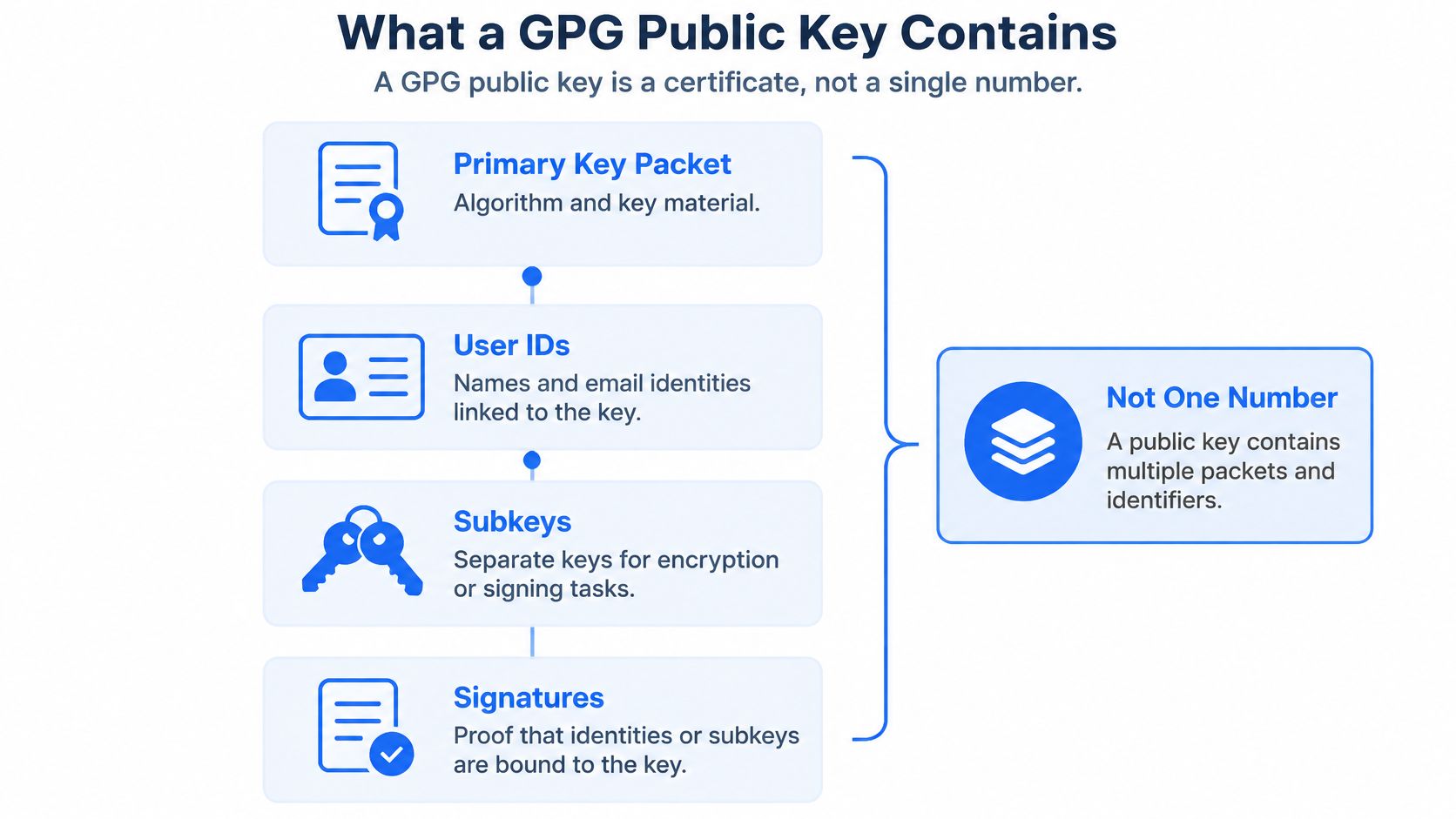
A GPG public key is normally a transferable OpenPGP certificate, not a single number. It packages cryptographic material together with identity claims, signatures, and operational keys. GnuPG is the software; OpenPGP is the format and protocol it implements.
The certificate structure and version-specific identifiers are defined in RFC 9580: version 4 fingerprints contain 40 hexadecimal characters, while version 6 fingerprints contain 64. Those fingerprints identify a key, but you still need an independent check to connect that key to a person or organization.
Components of a GPG public key
| Component | What It Holds | Why It Matters |
|---|---|---|
| Primary key | Key material and algorithm for the identity | Sets how software interprets every other part |
| User ID | Name and email attached to the key | A claim made by the key holder, not proof of identity |
| Self-signature | Binding of a user ID to the primary key | Lets software confirm the identity text belongs with this key |
| Subkey | Separate key for encryption or signing | Limits daily use so the primary key can stay offline |
| Full fingerprint | Version-specific cryptographic digest identifying the primary key | The authoritative key reference to verify and store |
| Key ID | Shortened identifier derived from the fingerprint | Can collide with another key; never use alone |
Start with the primary key, which anchors the certificate. Then read the user ID, often displayed as a name and email address. A self-signature establishes that the key holder attached that identity text, not that an employer or identity authority approved it.
A subkey handles a particular task, such as encryption or signing. Keeping those tasks separate makes it possible to replace an operational subkey without necessarily replacing the primary identity key.
Read the fingerprint, not just the label
A short key ID is a selector, not an authoritative identity reference. GnuPG recommends full fingerprints for automated processing because shorter identifiers can be ambiguous. Don't make an email address or short key ID your database primary key.
Run gpg --list-keys --fingerprint --with-subkey-fingerprint. Find the pub entry, its primary fingerprint, the uid entries, and each sub entry with its own fingerprint. Record the primary fingerprint as the certificate reference and keep subkey associations alongside it.
If the distinction between public and secret material is still unclear, BroLabel's public-private key pair guide explains the relationship. Sharing the public certificate is expected; protecting its corresponding private material is a separate responsibility.
Export, Import and Inspect Commands
| Task | Command | What to Check |
|---|---|---|
| List keys with full fingerprints | gpg --list-keys --fingerprint |
Full fingerprint, user IDs and subkeys shown for each key |
| Export ASCII-armored public key | gpg --armor --export FINGERPRINT |
Text output suitable for email; contains public material only |
| Export binary public key | gpg --export FINGERPRINT > key.gpg |
Compact file with the same public content |
| Inspect a file before import | gpg --show-keys key.asc |
Confirm the fingerprint matches what the owner stated |
| Import a public key | gpg --import key.asc |
Adds the key to the keyring but doesn't establish trust |
| Fetch from a keyserver | gpg --keyserver SERVER --recv-keys FINGERPRINT |
Treat the result as unverified until checked |
| Publish to a keyserver | gpg --keyserver SERVER --send-keys FINGERPRINT |
Publishes the public certificate, including imported revocations |
Replace FINGERPRINT with the complete primary fingerprint. Replace SERVER with your team's approved keyserver before running either keyserver command. These are placeholders, not values to paste unchanged.
ASCII armor is a text encoding of the public certificate. Binary export carries equivalent public content in a non-text representation; changing the encoding doesn't create a new key or change its identity.
A controlled onboarding sequence
- List your own certificate. Use the listing row and confirm that you've selected the intended work identity rather than a personal or retired key.
- Export the armored certificate. To save the output instead of printing it, run
gpg --armor --export FINGERPRINT > key.asc. - Separate delivery from confirmation. Send the file through the agreed delivery channel, then communicate the fingerprint through an independently established contact method.
- Inspect the received file using the inspection row. For explicit primary and subkey fingerprints, use
gpg --show-keys --fingerprint --with-subkey-fingerprint key.asc. - Import after the comparison succeeds. Run the import row, then complete your team's approval record before operational use.
The standard --export operation writes public material only. Exporting secret keys requires a separate, deliberate command; don't substitute a secret-key export when someone asks for your public certificate.
An import message means GnuPG processed the certificate. It doesn't mean the person named in the user ID has been authenticated, and it doesn't authorize a vendor or employee to use that key for your business.
Practical rule: Treat file handling, identity verification, and business approval as separate actions.
For installation and keyring troubleshooting, use the GPG add-key walkthrough. In your runbook, record the fingerprint rather than relying on key.asc, an attachment subject, or the sender's displayed email address.
Keyservers and Public Distribution Limits
A keyserver distributes public certificates so other people can retrieve them. It isn't an identity authority: receiving a certificate from a server doesn't establish that its uploader controls the named company, mailbox, or business role.
Server behavior isn't uniform. Traditional synchronizing keyservers can retain published certificates and identity information indefinitely, while other services impose verification, filtering, or deletion policies. Don't assume either that every upload is accepted unchanged or that an administrator can erase every copy afterward.
Distribution rules for a team runbook
- Approve the distribution service. Record the chosen server address and replace the command's
SERVERplaceholder before use. Check its publication and removal policies. - Publish and fetch using the full fingerprint, not an email-address search result. A matching mailbox label isn't enough to choose a certificate.
- Distribute revocations promptly. Import the revocation into the local certificate, then publish that updated certificate through the same channels used for the original.
- When retrieving a certificate, compare it against the owner's independently confirmed fingerprint before certification or production approval. Keyserver retrieval itself imports into the local keyring, so don't confuse that import with authorization.
- Maintain an owner-controlled reference. Publish the fingerprint on an official company page or signed release page, while retaining an independent confirmation process for onboarding and changes.
A revocation marks a key as withdrawn; deleting a download page doesn't provide that signal to people who already hold copies. Nor does publishing a revocation guarantee that every recipient immediately refreshes their local keyring.
Publish only identity information you're prepared to distribute publicly. A keyserver is a distribution channel, not a verification step.
For partner integrations, document who monitors updates and who blocks use after a revocation notice. Otherwise, operations staff may keep using an old local certificate even after security staff have announced its withdrawal.
Algorithms and Key Sizes Worth Using
| Algorithm | Status for New Keys | Typical Size | Notes |
|---|---|---|---|
| Ed25519 signing | Recommended where recipients support it | 256-bit curve | Compact and fast; check older clients first |
| Curve25519 encryption subkey | Recommended pairing with Ed25519 | 256-bit curve | Separate encryption component, not an Ed25519 encryption key |
| RSA | Compatible fallback | 3072 or 4096 bits | Useful when recipient compatibility requires RSA |
| DSA | Legacy, avoid for new keys | Inspect the existing key's declared size | Historical signing algorithm |
| ElGamal | Legacy, avoid for new keys | Inspect the existing key's declared size | Historical encryption algorithm paired with DSA |
Choose Ed25519 for signing with a Curve25519 encryption subkey when all required clients support that combination. Use RSA as a compatibility fallback, not because its larger bit count can be compared directly with an elliptic-curve key's size. Those numbers describe different cryptographic constructions.
The empirical OpenPGP ecosystem study reports that GnuPG used 2048-bit RSA as its default from 2009, that this size remained more common until approximately 2015, and that 4096-bit RSA became increasingly prevalent afterward. In its approximately 5-million-key dataset, RSA and DSA together accounted for 99.75% of observed public-key algorithms, describing that historical dataset rather than your current inventory.
Make compatibility an explicit decision
- Check the oldest required client. Include partner automation, package tooling, recovery systems, and hardware devices, not just engineers' laptops.
- Choose the most modern supported option and test actual encryption and signature verification. A successful import alone isn't an interoperability test.
- Record the decision. Put the algorithm, size or curve, compatibility reason, and replacement owner in the register.
DSA and ElGamal belong in a legacy migration plan, not a new-key template. Flag RSA-2048 and DSA certificates for review, identify the systems that depend on them, and assign replacement dates rather than deleting them before replacements work.
Don't confuse OpenPGP keys with shared network secrets. If your team also manages Wi-Fi or VPN credentials, Finchum Fixes IT's PSK security best practices provide useful context for that separate credential model.
How to Verify a Key Belongs to Its Owner
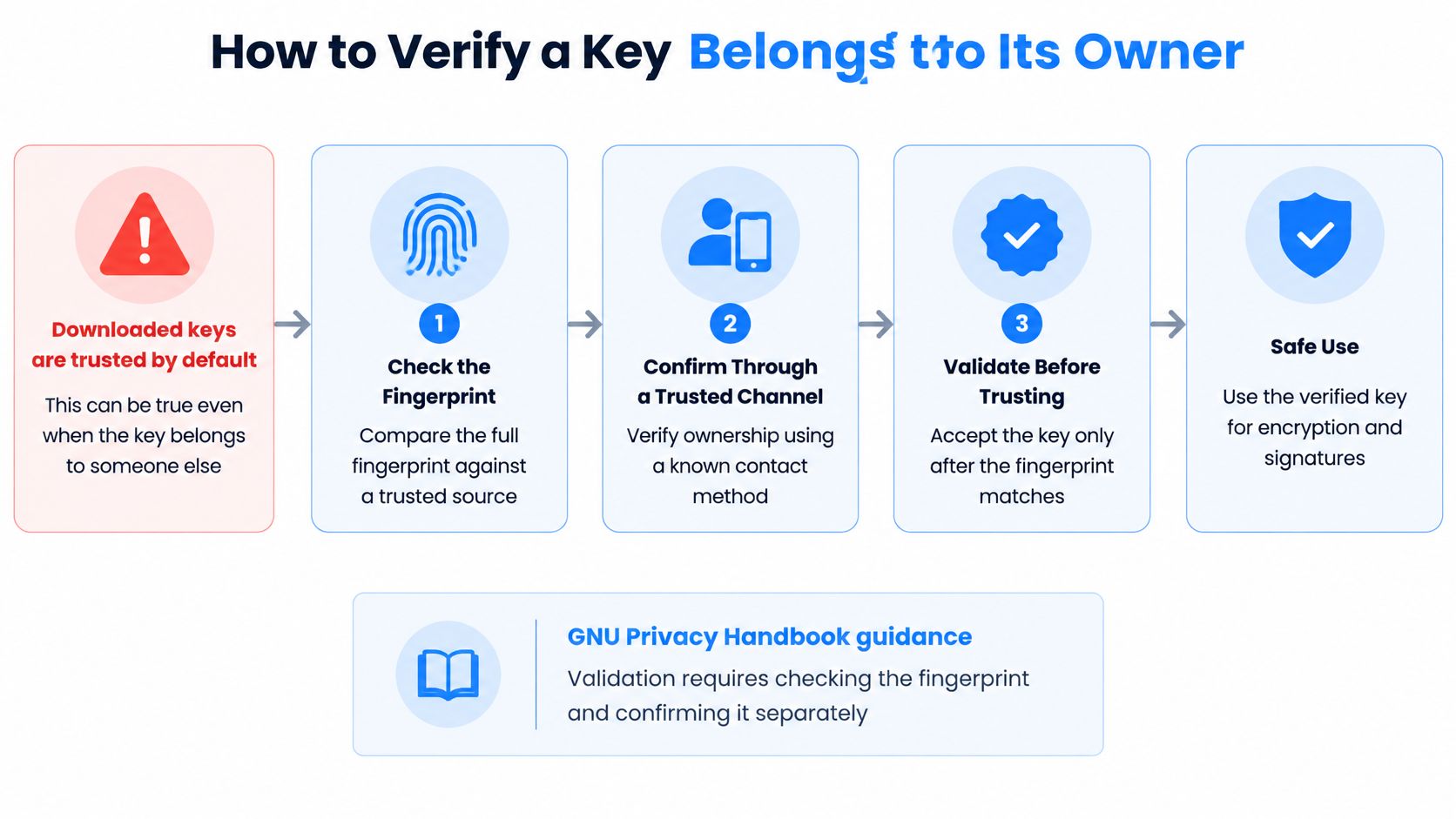
A downloaded public key is a claim, not proof of identity. The proof comes from checking its full fingerprint through an independent channel, then recording who approved the match and why.
Correct commands cannot replace a clear approval procedure. A person can import and use a key successfully while still sending sensitive information to the wrong recipient.
Verify, certify, then record
- Obtain the full primary fingerprint independently. Call an established contact using a number you already have, or compare fingerprints in person. A number supplied in the same suspicious email is not an independent check.
- Compare the complete fingerprint, character by character. Ignore spaces and letter case, but do not rely on a familiar-looking ending.
- Certify locally after the match. If your policy uses local certifications, run
gpg --lsign-key FINGERPRINTand select only the identities you verified. A local certification records your validation; ownertrust controls how much you rely on another person's certifications. - Add the approved fingerprint to the team register, with the verification date, approver, method, and permitted business purpose. Record enough evidence for another reviewer to follow the decision.
- Stop if the fingerprint changes unexpectedly. Treat the new value as a fresh claim that requires verification, not as an automatic configuration update.
For example, a supplier sends a key for an accounts-payable mailbox. Calling a finance contact at a previously known number can confirm who authorized it. Replying to the same mailbox only checks access to the channel that delivered the key.
Shared identities and replacement keys
A shared mailbox needs an accountable organizational owner. Record who controls the private key material, who may approve its use, and which mailbox users may decrypt or sign. The mailbox name alone does not answer those questions.
A replacement key has a new primary fingerprint. A statement signed by the old key can help establish continuity, but it is not enough on its own when compromise prompted the change.
Approval also depends on the people and channels involved. Guidance on protecting staff accounts from cyber attacks can provide context for securing those accounts.
Keep a register with the owner, purpose, primary fingerprint, approved subkeys, verification evidence, approver, and lifecycle state. Set the rule plainly: no new encrypted partner exchange begins until the fingerprint comparison and approval are recorded.
Expiry, Rotation and Revocation Records
| Event | Required Action | Record to Keep | Approver |
|---|---|---|---|
| Key creation | Set an expiry date and generate a revocation certificate | Full fingerprint, creation date, owner | Key owner and security reviewer |
| Expiry approaching | Extend, or rotate to a successor key signed by the old one | Old and new fingerprints, change date | Key owner |
| Planned rotation | Publish the new key and announce the switch through verified channels | Old and new fingerprints, distribution list | Security reviewer |
| Suspected compromise | Revoke immediately and publish the revocation | Revocation time, reason, affected systems | Named security lead |
| Owner leaves the team | Revoke or transfer organizational responsibility where appropriate | Departure date, new owner or revocation | Team lead and security lead |
| Fingerprint changes unexpectedly | Stop use and re-verify through a second channel | Investigation notes, final decision | Security lead |
Expiry, rotation, and revocation solve different problems. Treating them as interchangeable leaves gaps in incident response.
Expiry is a planned limit on new use. It doesn't erase old ciphertext or automatically make every historical signature invalid; historical verification depends on the signature, timing, policy, and available evidence.
Rotation introduces a successor. For a planned transition, publish the replacement early, have the old key certify the successor where your process supports it, and confirm that counterparties have adopted it before retiring the old operational path.
Prepare withdrawal before you need it
Revocation is a signed notice that a key must no longer be used. Generate or preserve the revocation certificate at creation and store it separately from the working private key, with controlled access and a documented recovery procedure.
To distribute a prepared revocation, import it locally and republish the updated public certificate. Don't upload an unactivated emergency revocation merely to test distribution, because applying it withdraws the key.
- Expiring subkey: Replacing an operational subkey can preserve the primary fingerprint. Record the new subkey's association and distribute the updated certificate.
- Departing employee: Revoke personal work identities as appropriate. For an organizational key, transfer accountability only after assessing access and replacing material the departing employee could retain.
- Automated workload: Name a human owner who can approve changes and respond when signing or decryption fails.
Review expiry dates quarterly as an operating policy, with alerts early enough to complete partner testing. Record each change with its date and approver, preserving previous states rather than overwriting them.
The audit question isn't only whether a certificate is valid today. It's whether the team can establish what it accepted at the time of a particular exchange.
Controls for Team and API Key Workflows
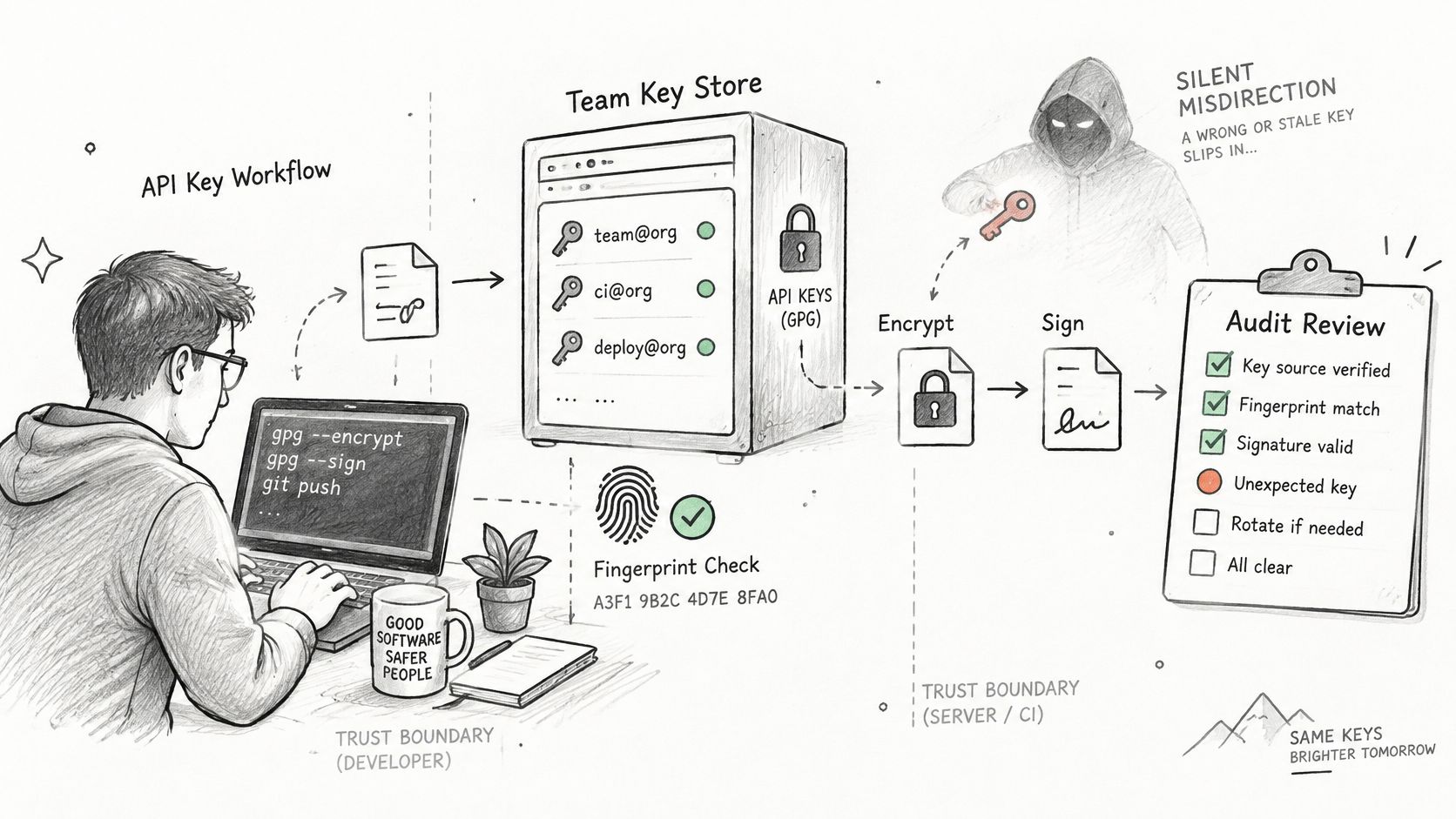
Silent misdirection occurs when a wrong or stale key receives sensitive data, or when an application accepts signatures under an unauthorized identity. Strong algorithms won't fix a system that selects the wrong authorized party.
Use the full fingerprint as the integration's certificate reference. Store key version, algorithm, creation time, expiry state, revocation status, subkey associations, named owner, permitted purpose, and approval evidence. Keep identity approval separate from the application's permissions.
The NIST Key Management Guidelines address protection of keying material and the planning and management functions surrounding cryptography. Apply that governance by separating public distribution from private-key protection, documenting approval authority, and preserving lifecycle evidence.
Separate identity, authority, and execution
A valid signature establishes possession of corresponding private material, not permission to move funds. Your application must still check the signer's role, transaction policy, destination, and current credential state.
- Scope credentials narrowly. Give a reconciliation worker read access, not withdrawal authority. Keep production and test credentials separate.
- Make retries safe. Persist one idempotency key with each business operation and reuse it with matching parameters while resolving an uncertain result.
- Prepare emergency replacement. Test how to disable credentials, approve replacements, and restore service without bypassing review.
Stripe's idempotent-request documentation explains how client-generated keys identify retries of the same operation. Apply that discipline to payouts: a timeout means the result is unknown, not that the operation failed, so don't generate a fresh business operation just to retry transport.
Use WebSocket events for operational visibility, then reconcile event-driven state against the operating ledger and network outcome. An event notification isn't, by itself, a complete accounting record or proof that a transaction has reached your required finality.
Start the audit with actionable questions
Ask which keys lack named owners, which have passed expiry, and which credentials hold broader permissions than their jobs require. Assign a remediation owner to each finding and block high-risk use until the control is restored.
For automated agents, apply the same standard as for human operators. An agent's ability to construct a request must not imply unrestricted authority to approve or sign it.
Common Questions About GPG Public Keys
Can I remove a key from a keyserver after publishing it?
Don't rely on removal. Traditional keyservers and redistributed copies can preserve a certificate or user ID even when a particular service offers deletion, so publish only information suitable for public distribution.
Use a revocation to communicate withdrawal and notify your counterparties directly. The distribution rules under Keyservers and Public Distribution Limits help distinguish removing a hosted copy from warning existing holders.
How long should a GPG key live before expiry?
Choose an expiry policy at creation based on the identity's purpose, recovery arrangements, and how quickly partners can adopt updates. There isn't a universal lifetime that makes every workflow safe.
Use the scheduled review under Expiry, Rotation and Revocation Records to decide whether to extend or replace the key. A short lifetime without a functioning renewal process can create an avoidable outage.
What should I do if a partner's fingerprint changes?
Pause new use and confirm the replacement through an established independent channel. Ask whether the change is planned rotation, loss of access, or suspected compromise, because each requires different treatment of the previous certificate.
Follow the approval procedure under How to Verify a Key Belongs to Its Owner and retain both the old record and the replacement decision. Don't let an emailed attachment overwrite an approved production reference.
Does a GPG key replace API credentials?
No. OpenPGP supports message encryption and signature verification; its hybrid encryption design protects data with a symmetric session key and encrypts that session key for recipients, as described in RFC 4880.
API credentials authenticate application requests under an API's own protocol and authorization rules. Use the ownership, permission, and replacement controls under Controls for Team and API Key Workflows for both, without assuming the formats or permissions are interchangeable.
Confirm Your Verification Policy Before You Ship
Settle the approval policy before connecting a key to production:
- Approval authority: Name who may accept partner fingerprints and authorize replacements.
- Independent channel: Specify which established contact methods qualify for confirmation.
- Review schedule: Define expiry reviews and assign responsibility for overdue actions.
- Recovery storage: Record where revocation certificates live and who can retrieve them.
- Register ownership: Keep the approval history somewhere operations, security, and compliance can access appropriately.
Confirm that every ownerless key, expired certificate, and overprivileged credential has an assigned resolution. Test the failure path too: the team should know what happens when approval is denied, a signer disappears, or a network submission returns an uncertain result.
Apply the same discipline to wallet infrastructure
For payment, treasury, and signing flows, BroSettlement provides API-oriented wallet infrastructure with DKG, network submission, and MPC 2-of-3 signing across 10 networks. Key shares are distributed among independent parties, and the customer-controlled Co-Signer adds a client-held approval step to the signing policy; no single share holder can sign alone.
Within the wider stack, BroWallet supports wallet-facing flows, while AI Agents can use per-agent wallets with role-based controls and audit trails. Pair scoped API keys with policy checks, use WebSocket events to observe outcomes, and reconcile the append-only operating ledger against completed operations. Our Ed25519 authentication applies to every request, but authentication still needs explicit authorization and retry controls.
These controls reduce single-key failure. They don't replace partner fingerprint checks, turn a GPG certificate into an API credential, or remove your responsibility to approve the intended counterparty.
BroLabel offers modular wallet, signing, ledger, and event infrastructure for teams that need accountable financial operations rather than an isolated key-management primitive. Visit BroLabel to review the sandbox and console setup, then test your approval, retry, and reconciliation policies before enabling production signing. Bro has your back.